

22 Aug Why Do You Need Enterprise Cloud Security
Why do you need enterprise cloud security?
Businesses are largely spending on cloud services, but not as much on their security preparedness. A recent survey has shown that when businesses spend around $10 million on cloud services, only one-third of this spending were ensuring the security of cloud resources.
What is enterprise cloud security?
What are the different cloud security issues faced by enterprises?
- Lack of understanding of what needs to be addressed
- Creating the framework to face the issues
Also, insider threats are giving enterprises lots of botheration. Weak internal configurations and insecure APIs are causing cloud vulnerabilities and data loss.
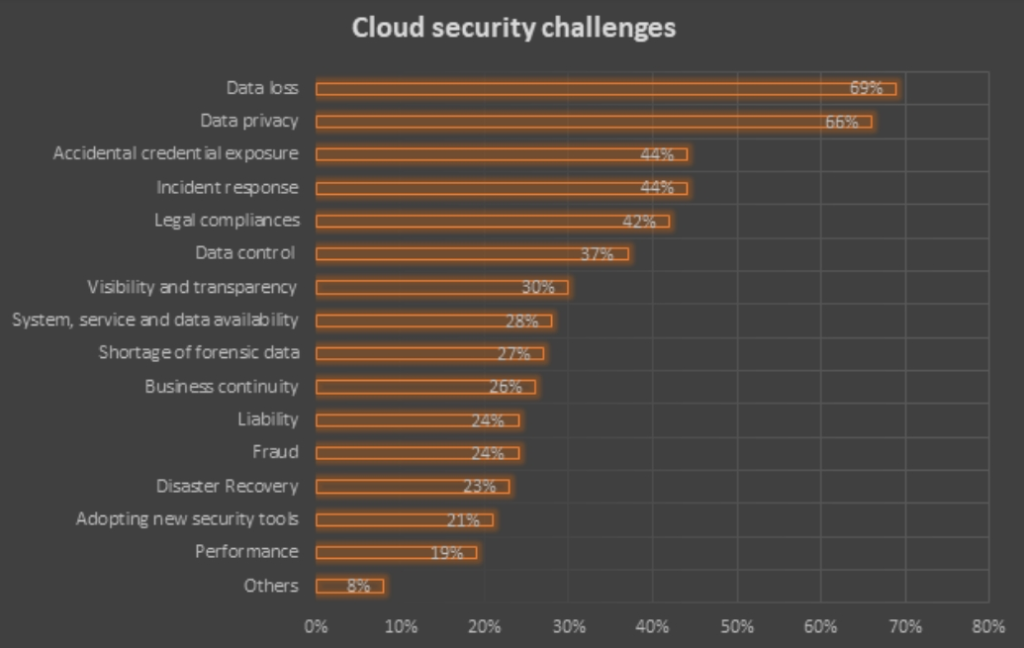
An online survey was conducted recently on around 650 cybersecurity professionals. 69% of the respondents said that data loss was the primary concern and 66% respondents shared data privacy as their main concern
Following were the other cloud security challenges businesses faced:
What makes cloud security important?
- Application Program Integration (API) and Command Line Interface (CLI) tools
- Cloud identity
- Container security
- Cloud Security Posture
- Management (CSPM) as a working process
How to implement a cloud security system?
Phase #1: Cloud monitoring
- Identify sensitive or regulated data using data classification engines. This will avoid regulatory penalties or loss of intellectual property rights leading to data loss.
- Track who is accessing the sensitive data by evaluating permissions on files and folders in your cloud environment.
- Discover the availed cloud services that you are unaware of. Run risk profile assessments using a web proxy or SIEM logs.
- Your IaaS ecosystem will have many vulnerabilities arising from misconfigurations. Audit configurations, safeguard network configuration and encryption.
- Reduce data loss occurring due to careless employees or outside attackers. User Behavior Analytics (UBA) can be deployed to expose such mistrustful user behaviors in the enterprise.
Phase #2: Cloud protection
Encrypt your data from a third party. Make sure that you use your own keys so that the cloud service providers will not have access to your sensitive data.
Enable data sharing controls by applying access control policies. You can start by changing control settings to viewer/editor modes and restricting the kind of data that can be shared externally through links.
Azure and AWS offer anti-malware technology to the IaaS settings for protecting the infrastructure. For single-purpose workloads, you can deploy application whitelisting and memory exploit prevention. For general-purpose workloads, machine Learning-based protection can be deployed.
Phase #3: Cloud security incident response
- Enable additional verification practices like two-step authentication for proving identity when a user tries to access highly sensitive data from a new device
- Integrate cloud risk database with secure gateways/firewalls for automatically updating web access policies. This way you will have a warning message when a risk profile tries to access the cloud data. You will be able to deny access or block the risk profiles immediately by opting for such cloud access policy adjustments.
- Remove malware from the cloud ecosystem by scanning your files. Malware can risk files in a shared folder by automatically synchronizing with a cloud storage service. Scanning files and removing malware can avoid ransomware threats and data breaches.